Updated on 5 Aug 2023
This Pro tutorial provides the steps to set up tsParticles, a lightweight TypeScript (uses JavaScript) library for creating particles as background for a section in Bricks.
Step 1
Edit the Page set as your site’s homepage (at Settings → Reading) with Bricks. This is a static Page that is typically titled “Home”.
Copy and paste the sample Section using the JSON link given below.
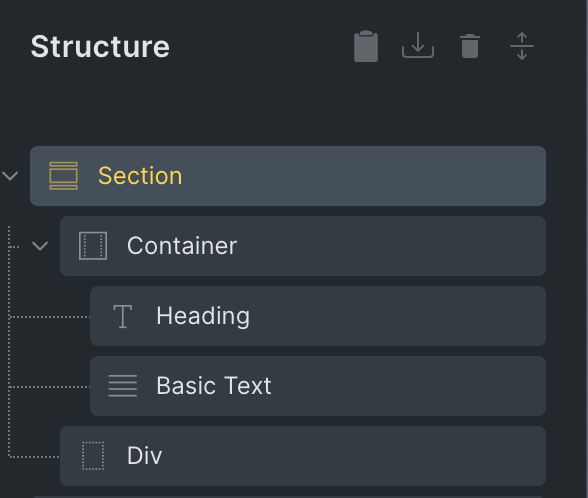
The Div element should have the CSS ID set to tsparticles.
We are going to specify that an HTML element with this ID be the container for the particles animation.
Step 2
Create a directory called assets in the child theme directory.
Inside that create a directory called js.
Download tsparticles.bundle.min.js from here and upload it to the above directory.
Edit child theme’s functions.php.
Change
add_action( 'wp_enqueue_scripts', function() {
	// Enqueue your files on the canvas & frontend, not the builder panel. Otherwise custom CSS might affect builder)
	if ( ! bricks_is_builder_main() ) {
		wp_enqueue_style( 'bricks-child', get_stylesheet_uri(), ['bricks-frontend'], filemtime( get_stylesheet_directory() . '/style.css' ) );
	}
} );
to
add_action( 'wp_enqueue_scripts', function() {
	// Enqueue your files on the canvas & frontend, not the builder panel. Otherwise custom CSS might affect builder)
	if ( ! bricks_is_builder_main() ) {
		wp_enqueue_style( 'bricks-child', get_stylesheet_uri(), ['bricks-frontend'], filemtime( get_stylesheet_directory() . '/style.css' ) );

		if ( is_front_page() ) {
			wp_enqueue_script( 'tsparticles', get_stylesheet_directory_uri() . '/assets/js/tsparticles.bundle.min.js', [], '2.12.0' );
		}
	}
} );
if ( is_front_page() ) conditional ensures that the tsparticles JavaScript file gets loaded only on the homepage. If you are working with a different kind of page, you would need to modify the if condition accordingly.
Step 3
Back in the Bricks editor, click on Settings (gear icon) → PAGE SETTINGS → CUSTOM CODE.
Paste the following in Body (footer) scripts:
<script>
tsParticles.load("tsparticles", {"autoPlay":true,"background":{"color":{"value":"#0d47a1"},"image":"","position":"50% 50%","repeat":"no-repeat","size":"cover","opacity":1},"backgroundMask":{"composite":"destination-out","cover":{"color":{"value":"#fff"},"opacity":1},"enable":false},"defaultThemes":{},"delay":0,"fullScreen":{"enable":false,"zIndex":1},"detectRetina":true,"duration":0,"fpsLimit":120,"interactivity":{"detectsOn":"window","events":{"onClick":{"enable":true,"mode":"repulse"},"onDiv":{"selectors":[],"enable":false,"mode":[],"type":"circle"},"onHover":{"enable":true,"mode":"bubble","parallax":{"enable":false,"force":2,"smooth":10}},"resize":{"delay":0.5,"enable":true}},"modes":{"attract":{"distance":200,"duration":0.4,"easing":"ease-out-quad","factor":1,"maxSpeed":50,"speed":1},"bounce":{"distance":200},"bubble":{"distance":400,"duration":0.3,"mix":false,"opacity":1,"size":4,"divs":{"distance":200,"duration":0.4,"mix":false,"selectors":[]}},"connect":{"distance":80,"links":{"opacity":0.5},"radius":60},"grab":{"distance":400,"links":{"blink":false,"consent":false,"opacity":0.5}},"push":{"default":true,"groups":[],"quantity":4},"remove":{"quantity":2},"repulse":{"distance":200,"duration":0.4,"factor":100,"speed":1,"maxSpeed":50,"easing":"ease-out-quad","divs":{"distance":200,"duration":0.4,"factor":100,"speed":1,"maxSpeed":50,"easing":"ease-out-quad","selectors":[]}},"slow":{"factor":3,"radius":200},"trail":{"delay":1,"pauseOnStop":false,"quantity":1},"light":{"area":{"gradient":{"start":{"value":"#ffffff"},"stop":{"value":"#000000"}},"radius":1000},"shadow":{"color":{"value":"#000000"},"length":2000}}}},"manualParticles":[],"particles":{"bounce":{"horizontal":{"random":{"enable":false,"minimumValue":0.1},"value":1},"vertical":{"random":{"enable":false,"minimumValue":0.1},"value":1}},"collisions":{"absorb":{"speed":2},"bounce":{"horizontal":{"random":{"enable":false,"minimumValue":0.1},"value":1},"vertical":{"random":{"enable":false,"minimumValue":0.1},"value":1}},"enable":false,"mode":"bounce","overlap":{"enable":true,"retries":0}},"color":{"value":"#fff","animation":{"h":{"count":0,"enable":false,"offset":0,"speed":1,"decay":0,"sync":true},"s":{"count":0,"enable":false,"offset":0,"speed":1,"decay":0,"sync":true},"l":{"count":0,"enable":false,"offset":0,"speed":1,"decay":0,"sync":true}}},"groups":{},"move":{"angle":{"offset":0,"value":90},"attract":{"distance":200,"enable":false,"rotate":{"x":600,"y":1200}},"center":{"x":50,"y":50,"mode":"percent","radius":0},"decay":0,"distance":{},"direction":"bottom","drift":0,"enable":true,"gravity":{"acceleration":9.81,"enable":false,"inverse":false,"maxSpeed":50},"path":{"clamp":true,"delay":{"random":{"enable":false,"minimumValue":0},"value":0},"enable":false,"options":{}},"outModes":{"default":"out","bottom":"out","left":"out","right":"out","top":"out"},"random":false,"size":false,"speed":2,"spin":{"acceleration":0,"enable":false},"straight":false,"trail":{"enable":false,"length":10,"fill":{}},"vibrate":false,"warp":false},"number":{"density":{"enable":true,"width":1920,"height":1080},"limit":0,"value":400},"opacity":{"random":{"enable":true,"minimumValue":0.1},"value":{"min":0.1,"max":0.5},"animation":{"count":0,"enable":false,"speed":1,"decay":0,"sync":false,"destroy":"none","startValue":"random","minimumValue":0.1}},"reduceDuplicates":false,"shadow":{"blur":0,"color":{"value":"#000"},"enable":false,"offset":{"x":0,"y":0}},"shape":{"options":{},"type":"circle"},"size":{"random":{"enable":true,"minimumValue":1},"value":{"min":1,"max":10},"animation":{"count":0,"enable":false,"speed":40,"decay":0,"sync":false,"destroy":"none","startValue":"random","minimumValue":0.1}},"stroke":{"width":0},"zIndex":{"random":{"enable":false,"minimumValue":0},"value":0,"opacityRate":1,"sizeRate":1,"velocityRate":1},"life":{"count":0,"delay":{"random":{"enable":false,"minimumValue":0},"value":0,"sync":false},"duration":{"random":{"enable":false,"minimumValue":0.0001},"value":0,"sync":false}},"rotate":{"random":{"enable":false,"minimumValue":0},"value":0,"animation":{"enable":false,"speed":0,"decay":0,"sync":false},"direction":"clockwise","path":false},"destroy":{"bounds":{},"mode":"none","split":{"count":1,"factor":{"random":{"enable":false,"minimumValue":0},"value":3},"rate":{"random":{"enable":false,"minimumValue":0},"value":{"min":4,"max":9}},"sizeOffset":true}},"roll":{"darken":{"enable":false,"value":0},"enable":false,"enlighten":{"enable":false,"value":0},"mode":"vertical","speed":25},"tilt":{"random":{"enable":false,"minimumValue":0},"value":0,"animation":{"enable":false,"speed":0,"decay":0,"sync":false},"direction":"clockwise","enable":false},"twinkle":{"lines":{"enable":false,"frequency":0.05,"opacity":1},"particles":{"enable":false,"frequency":0.05,"opacity":1}},"wobble":{"distance":5,"enable":false,"speed":{"angle":50,"move":10}},"orbit":{"animation":{"count":0,"enable":false,"speed":1,"decay":0,"sync":false},"enable":false,"opacity":1,"rotation":{"random":{"enable":false,"minimumValue":0},"value":45},"width":1},"links":{"blink":false,"color":{"value":"#ffffff"},"consent":false,"distance":500,"enable":false,"frequency":1,"opacity":0.4,"shadow":{"blur":5,"color":{"value":"#000"},"enable":false},"triangles":{"enable":false,"frequency":1},"width":2,"warp":false},"repulse":{"random":{"enable":false,"minimumValue":0},"value":0,"enabled":false,"distance":1,"duration":1,"factor":1,"speed":1}},"pauseOnBlur":true,"pauseOnOutsideViewport":true,"responsive":[],"smooth":false,"style":{},"themes":[],"zLayers":100});
</script>
The load method of tsParticles object accepts two arguments. The first one is the ID of the DOM element inside which tsParticles will create a canvas. The second one is a JSON configuration object.
To change from the snow animation to a different one
Go to the demo / generator.
Select your desired animation from the Presets dropdown.
Important: Do NOT copy and use the JSON config after switching from Form to Code on this page. Instead, do this:
Click More → Export to CodePen.
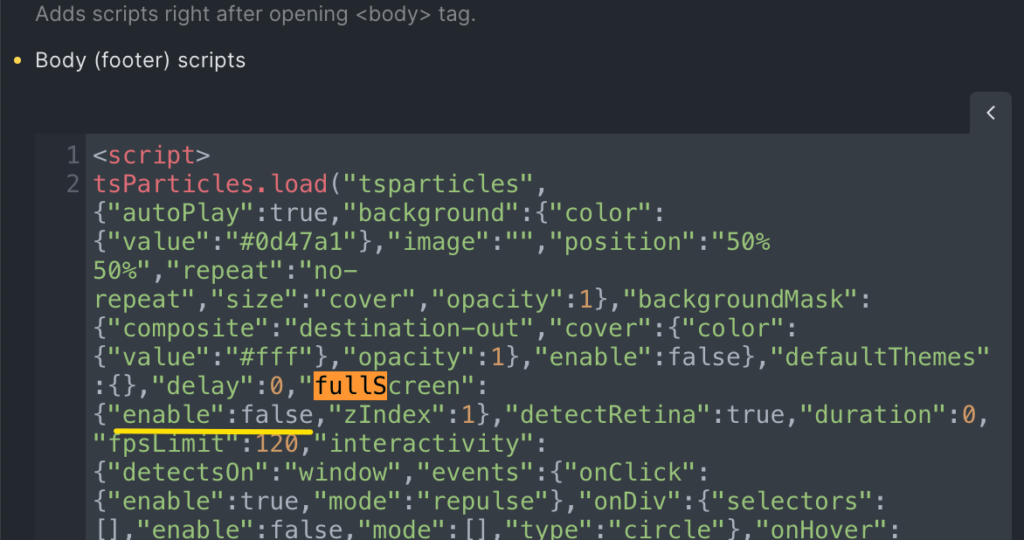
Copy the code from the CodePen (from the JS section) and paste in Body (footer) scripts between the opening and closing script tags replacing the existing one.
Do a Ctrl/Cmd + F, search for fullscreen and set/ensure that enable is false.