Updated on 09 Sep 2023
Single WooCommerce products appear fine out of the box and are rendered by the theme in Bricks.
If you wish to customize this layout visually, you would need to re-build it using the WooCommerce elements that Bricks provides. We did this for you and in this Pro tutorial we share an export of the Bricks Template for single products.


Step 1
Download this json file.
Import it to your Bricks site at Bricks → Templates.
Make sure its template type is “WooCommerce – Single product”.
Step 2
Edit the Template with Bricks.
Click on the Settings gear icon → TEMPLATE SETTINGS → CONDITIONS: Post Type: Products.
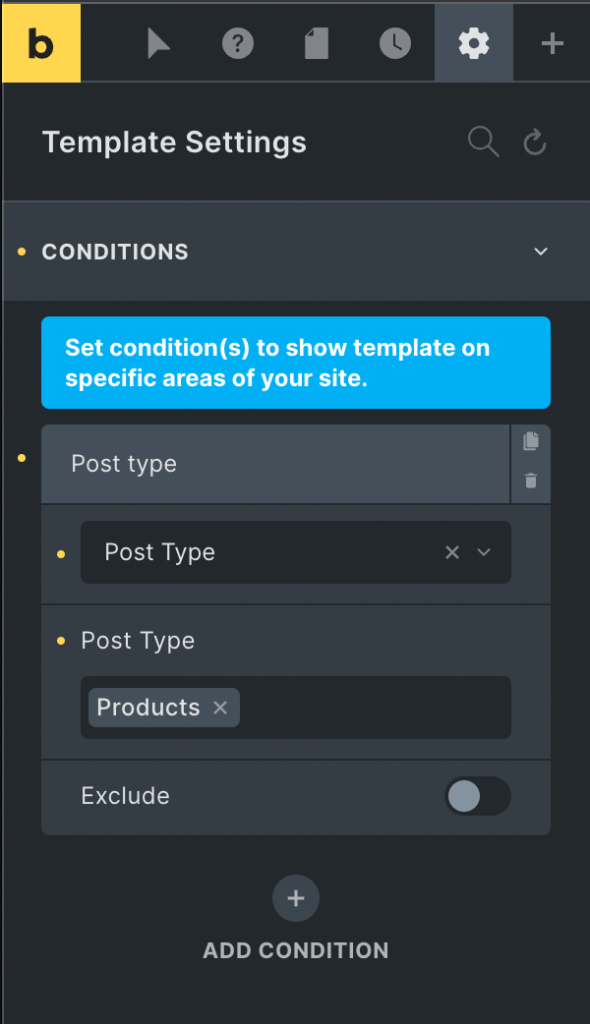
Under POPULATE CONTENT search for to locate one of the existing products under Single post/page.

Now you are ready to customize it further as needed.