Updated on 21 Aug 2024
This Pro tutorial shows how custom query types for each navigation menu can be generated in Bricks.
This enables us to loop through the menu items of any nav menu and visually build menu items’ titles/text linked to their URLs with optional descriptions.
Use case: When a footer from a design set like Frames is imported, delete all but the first list item, enable query loop on it, and select the nav menu from the query type dropdown to make the static items dynamic.
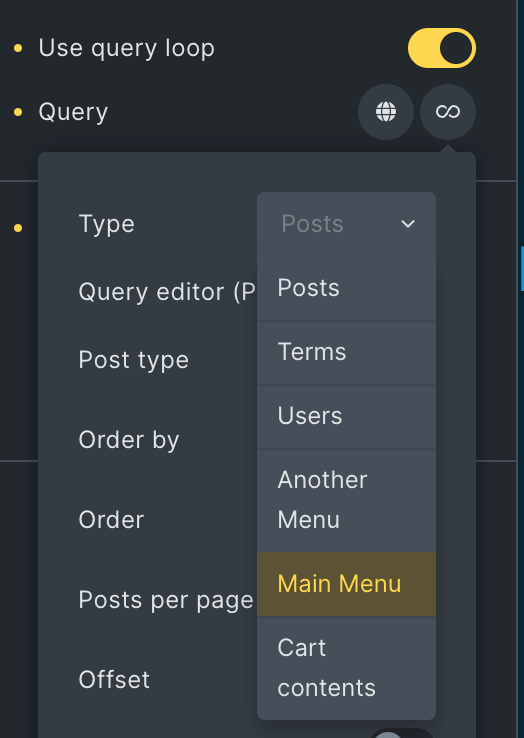

Note: All items of the selected menu will appear at the same level regardless of their hierarchy/depth in the menu. If hierarchy is to be maintained with indentation, you may want to use a Nav Menu element instead of this approach.
Step 1
Add the following in child theme‘s functions.php (w/o the opening PHP tag) or a code snippets plugin:
<?php

/**
 * Returns an array of names of all registered nav menus.
 *
 * @return array<string> Array of nav menu names.
 */
function bl_get_nav_menu_names(): array {
    // Retrieve all registered navigation menus
    $nav_menus = wp_get_nav_menus();

    // If no menus are found, return an empty array
    if ( empty( $nav_menus ) ) {
        return [];
    }

    // Extract only the names from the nav menu objects
    return array_map( static function( $nav_menu ) {
        return $nav_menu->name;
    }, $nav_menus );
}

/**
 * Adds new query type controls to query options.
 *
 * @param array<string, mixed> $control_options Existing control options.
 * @return array<string, mixed> Modified control options.
 */
function bl_add_nav_menu_query_types( array $control_options ): array {
    // Get all registered nav menu names
    $nav_menus = bl_get_nav_menu_names();

    // If no menus are found, return the original control options
    if ( empty( $nav_menus ) ) {
        return $control_options;
    }

    // Add a new query type for each nav menu
    foreach ( $nav_menus as $menu_name ) {
        // Create a slug from the menu name for use in the query type key
        $menu_slug = sanitize_title( $menu_name );
        // Add the new query type to the control options
        $control_options['queryTypes'][ "bl_custom_nav_menu_query_{$menu_slug}" ] = esc_html( $menu_name );
    }

    return $control_options;
}
// Hook the function to modify Bricks Builder control options
add_filter( 'bricks/setup/control_options', 'bl_add_nav_menu_query_types' );

/**
 * Runs new query if the option is selected.
 *
 * @param array<mixed>   $results   Query results.
 * @param BricksQuery  $query_obj Query object.
 * @return array<mixed> Modified query results.
 */
function bl_run_custom_nav_menu_query( array $results, BricksQuery $query_obj ): array {
    // Get all registered nav menu names
    $nav_menus = bl_get_nav_menu_names();

    // If no menus are found, return the original results
    if ( empty( $nav_menus ) ) {
        return $results;
    }

    // Check if the current query matches any of our custom nav menu queries
    foreach ( $nav_menus as $menu_name ) {
        $menu_slug = sanitize_title( $menu_name );

        if ( $query_obj->object_type === "bl_custom_nav_menu_query_{$menu_slug}" ) {
            // If it matches, return the menu items for this menu
            return bl_get_nav_menu_items( $menu_name );
        }
    }

    // If no match is found, return the original results
    return $results;
}
// Hook the function to modify Bricks Builder query results
add_filter( 'bricks/query/run', 'bl_run_custom_nav_menu_query', 10, 2 );

/**
 * Returns results from custom nav menu items.
 *
 * @param string $menu_name Name of the menu.
 * @return array<int, array<string, mixed>> Array of menu items.
 */
function bl_get_nav_menu_items( string $menu_name ): array {
    // Get all items from the specified menu
    $menu_items = wp_get_nav_menu_items( $menu_name );

    // If no items are found, return an empty array
    if ( ! $menu_items ) {
        return [];
    }

    // Transform the menu items into a custom array format
    return array_map( static function( $item ) {
        return [
            'ID'          => $item->ID,
            'title'       => $item->title,
            'url'         => $item->url,
            'menu_order'  => $item->menu_order,
            'description' => $item->description,
            // Add other properties as needed.
        ];
    }, $menu_items );
}

/**
 * Gets the current looping object.
 *
 * @return array<string, mixed> Current loop object or empty array if not in a loop.
 */
function bl_get_loop_object(): array {
    // Check if we're currently inside any Bricks Builder loop
    $looping_query_id = BricksQuery::is_any_looping();

    if ( $looping_query_id ) {
        // If we're in a loop, get the current loop object
        return BricksQuery::get_loop_object( $looping_query_id );
    }

    // If we're not in a loop, return an empty array
    return [];
}

/**
 * Gets a specific element from the current loop object (an array in this case).
 *
 * @param string $element The element key to retrieve from the loop object.
 * @return string The value of the specified element or an empty string if not found.
 */
function bl_get_loop_object_element( string $element ): string {
    // Get the current loop object and return the specified element if it exists
    return bl_get_loop_object()[$element] ?? '';
}
Step 2
Whitelist the bl_get_loop_object_element function.
Ex.:
<?php

add_filter( 'bricks/code/echo_function_names', function() {
  return [
    'bl_get_loop_object_element'
  ];
} );
You should also add other functions (native or custom) being used in your Bricks instance besides bl_get_loop_object_element. This can be checked at Bricks → Settings → Custom code by clicking the Code review button.
More info on whitelisting can be found here.
Step 3
Set up a query loop or select an item on which a query loop is already enabled that you wish to set to be a nav menu loop.
To show the menu item title, use this dynamic data tag:
{echo:bl_get_loop_object_element(title)}
To show the menu item link, use this dynamic data tag:
{echo:bl_get_loop_object_element(url)}