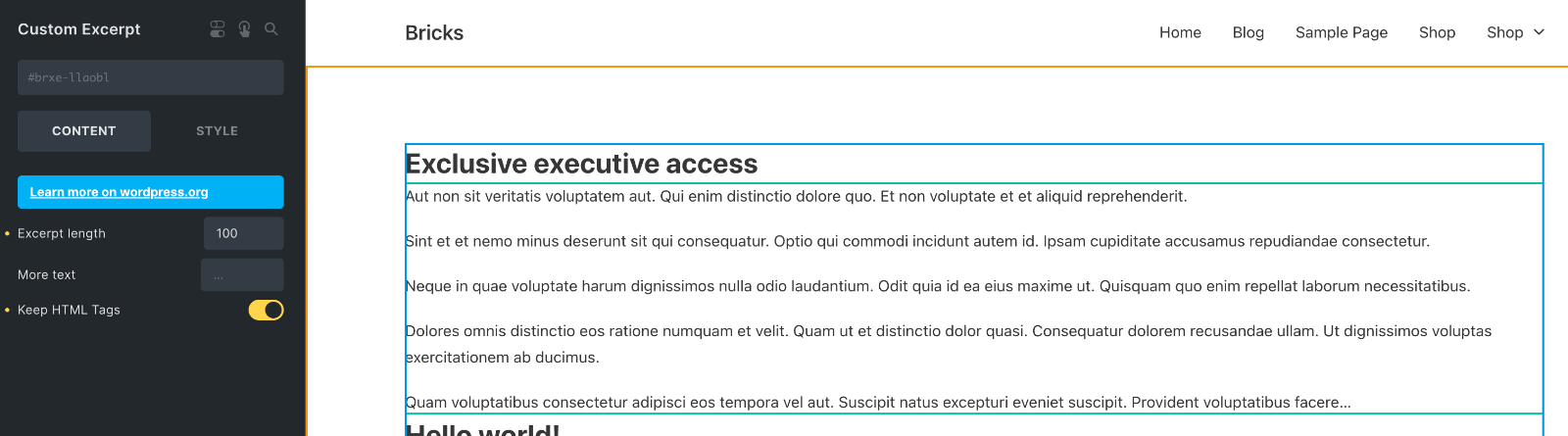
This Pro tutorial provides the steps to extend a Bricks element as a new element by duplicating and modifying it.
As of Bricks 1.6.1, there is no built-in control or option to specify that the HTML tags like p NOT get stripped in excerpts when using the Excerpt element.

We shall copy this element to the child theme as a Custom Excerpt element, add a “Keep HTML Tags” checkbox control, modify the output of render() such that if our custom checkbox is ticked, the HTML tags do not get removed.

Step 1
If the Bricks child theme is not active already, upload and activate it.
Copy/duplicate
/wp-content/themes/bricks/includes/elements/post-excerpt.php
as
/wp-content/themes/bricks-child/elements/custom-post-excerpt.php
Step 2
Edit the custom-post-excerpt.php file.
Change
class Element_Post_Excerpt extends Element {to
class Element_Custom_Post_Excerpt extends Element_Post_Excerpt {Element_Custom_Post_Excerpt is the name we are specifying for the PHP Class.
Change
public $name = 'post-excerpt';to
public $name = 'custom-post-excerpt';Change
return esc_html__( 'Excerpt', 'bricks' );to
return esc_html__( 'Custom Excerpt', 'bricks' );Next, let’s add the “Keep HTML Tags” checkbox control.
Below
$this->controls['more'] = [
    'tab'            => 'content',
    'label'          => esc_html__( 'More text', 'bricks' ),
    'type'           => 'text',
    'inline'         => true,
    'small'          => true,
    'hasDynamicData' => false,
    'placeholder'    => '...',
];
add
$this->controls['keep'] = [
    'tab'            => 'content',
    'label'          => esc_html__( 'Keep HTML Tags', 'bricks' ),
    'type'           => 'checkbox',
];
Inside the render method, you can see that a get_the_excerpt function is called.
This function is defined in /wp-content/themes/bricks/includes/helpers.php and accepts a boolean (true or false) as the value of its last parameter, $keep_html.
public static function get_the_excerpt( $post, $num_words, $excerpt_more = null, $keep_html = false ) {Back in our custom element in the child theme, elements/custom-post-excerpt.php, we need to obtain the value of the checkbox and pass it as the last parameter to the get_the_excerpt function call.
Below
$more = isset( $settings['more'] ) ? $settings['more'] : '…';add
$keep = isset( $settings['keep'] ) ? $settings['keep'] : false;and change
$excerpt = Helpers::get_the_excerpt( $this->post_id, $length, $more );to
$excerpt = Helpers::get_the_excerpt( $this->post_id, $length, $more, $keep );Here is the full modified file for reference.
Step 3
In child theme’s functions.php locate
/**
 * Register custom elements
 */
add_action( 'init', function() {
	$element_files = [
		__DIR__ . '/elements/title.php',
	];

	foreach ( $element_files as $file ) {
		BricksElements::register_element( $file );
	}
}, 11 );
near the beginning and add in the path to your custom element’s PHP file like this:
/**
 * Register custom elements
 */
add_action( 'init', function() {
	$element_files = [
		__DIR__ . '/elements/title.php',
		__DIR__ . '/elements/custom-post-excerpt.php',
	];

	foreach ( $element_files as $file ) {
		BricksElements::register_element( $file );
	}
}, 11 );
That’s it! Your new element is now available in the Bricks editor (if you already have it open, reload it).