Update on 22 Sep 2023: There’s a much simpler built-in method now. See this post.
In the Bricks Facebook group a user asks:
Is there a way, either using dynamic data or a custom PHP solution, to render an element based on if another element has content?
I’m sure there is, I just can’t get my head around it.
Use case:
I’m trying to use the Nestable Tabs element to display dynamic data. One of the tabs is using a query loop. If the query has no content/data, I want to hide the associated tab completely. I don’t want to use CSS to display: none – I want to complete stop the render of the tab.
I don’t mind using a custom class on the query loop or some a data attribute or something – but I can’t get it to work. Any pointers?
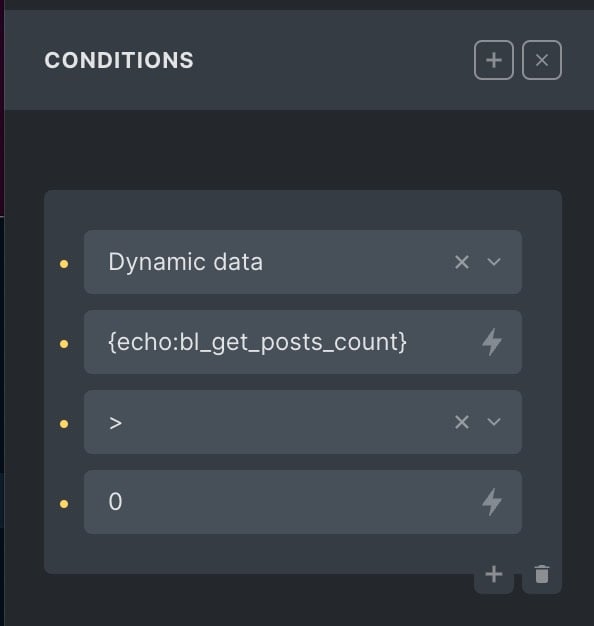
This can be done by creating a manual query with the same query parameters as what’s set in the builder, getting the count and checking against that using the Dynamic data condition.
The query in this example:

Step 1
Add the following in your child theme’s functions.php or a code snippets plugin:
function bl_get_posts_count() {
	// custom wp_query
	$args = array(
		'post_type' => 'post',
		'posts_per_page' => -1, // all matching posts
		'category__in' => array( 2, 6 ), // posts that have these categories (not children)
		'meta_query' => array(
			array(
				'key' => 'related_bios',
				'value' => get_the_ID(),
				// 'compare' => 'LIKE',
			),
		),
	);

	$posts = new WP_Query( $args );

	// return the count of posts
	return $posts->found_posts;
}
Step 2
Apply this condition to the element(s) that you wish to be output only if there is at least 1 post that matches our query.
