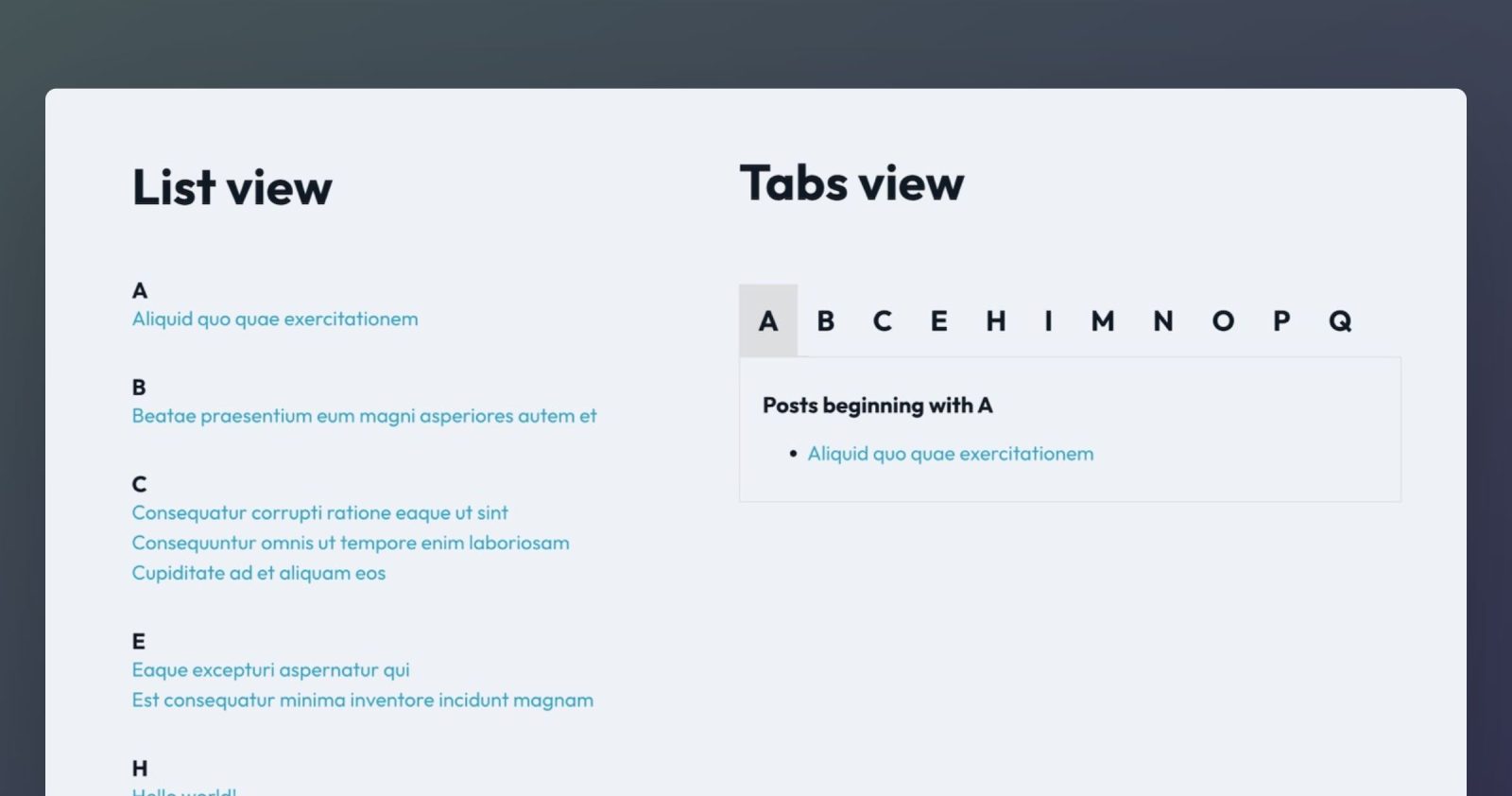
This Pro tutorial provides the steps to group posts (can be of any post type) by their starting letter in Bricks.
We shall define a custom function that loops through the posts and returns an array with the unique (among the ones that posts start with) alphabets as the keys and the corresponding posts’ array as the values.

The values are associative arrays having ID and title keys. Titles are needed so the posts can be arranged in ascending order.
We shall then create a custom query type called “Alphabetical Glossary” and feed the keys of the array returned by our custom function. This query type will be used to output the unique alphabets.
For showing the posts for each alphabet, we use the PHP query editor and do a look up of the matching post IDs via our custom function.
Nested queries are used in the list view and for the tab contents in the tabs view.
This is a classic example that demonstrates the power of querying in Bricks, PHP loops and arrays and some outside the box thinking esp. for the tabs view where we use the Tabs (Nestable) element.
Step 1
Add the following in child theme‘s functions.php (w/o the opening PHP tag) or a code snippets plugin:
<?php

function bl_get_posts_grouped_by_alphabet_asc( $posts_per_page = 100 ) {
	$result = [];

	$query_args = [
		'post_type' => 'post', // set your post type here
		'no_found_rows' => true,
		'posts_per_page' => $posts_per_page, // set a high number
		'orderby' => 'title',
		'order' => 'ASC',
	];

	$query = new WP_Query( $query_args );

	if ( ! is_wp_error( $query ) && ! empty( $query->posts ) ) {
		foreach ( $query->posts as $post ) {
			// Normalize first letter to uppercase for consistent grouping
			$first_letter = mb_strtoupper( mb_substr( $post->post_title, 0, 1 ) );

			if ( ! empty( $first_letter ) ) {
				$result[$first_letter][] = [
					'ID' => $post->ID,
					'title' => $post->post_title,
				];
			}
		}
	}

	if ( ! empty( $result ) ) {
		ksort( $result, SORT_STRING );
	}

	return $result;
}

// Add new query type control to query options.
add_filter( 'bricks/setup/control_options', function ( $control_options ) {

	$control_options['queryTypes']['bl_alphabetical_glossary'] = esc_html__( 'Alphabetical Glossary' );

	return $control_options;
} );

// Run new query if option selected.
add_filter( 'bricks/query/run', function ( $results, $query_obj ) {
	if ( $query_obj->object_type !== 'bl_alphabetical_glossary' ) return $results;

	// If option is selected, run our new query
	if ( $query_obj->object_type === 'bl_alphabetical_glossary' ) {
		$results = array_keys( bl_get_posts_grouped_by_alphabet_asc() );
	}

	return $results;
}, 10, 2 );

// Function to get the current looping object.
if ( ! function_exists( 'bl_get_loop_object_string' ) ) {
	function bl_get_loop_object_string(): string {
		$looping_query_id = BricksQuery::is_any_looping();

		if ( $looping_query_id ) {
			return BricksQuery::get_loop_object( $looping_query_id );
		}

		// fallback, this won't be the one that's output
		return '';
	}
}
Step 2
Edit the Page in which you’d like to show either the list view or the tabs view of the alphabet glossary with Bricks.
List view
Copy this JSON of the “Section – List View” from our dev site and paste it.

The outer “Alphabets Loop” query type should be set to “Alphabetical Glossary”.

For the inner “Posts Loop”, set PHP query to:
return [
  'post_type' => 'post', // your post type here
  'posts_per_page' => 100, // a large number
  'no_found_rows' => true,
  'post__in' => wp_list_pluck( bl_get_posts_grouped_by_alphabet_asc()[BricksQuery::get_query_for_element_id( 'bpxjia' )->loop_object], 'ID'),
  'orderby' => 'post__in',
];
Replace bpxjia with the Bricks ID of the outer query loop element.
Tabs view
Copy this JSON of the “Section – Tabs View” from our dev site and paste it.

The element labelled “Title”‘s query loop should be set to “Alphabetical Glossary”.

Same with “Pane”.

For the inner “Post Block”, set PHP query to:
$outer_loop_object = BricksQuery::get_query_for_element_id( 'zeyayk' )->loop_object;

return [
  'post_type' => 'post', // your post type here
  'posts_per_page' => 100, // a large number
  'no_found_rows' => true,
  'post__in' => wp_list_pluck( bl_get_posts_grouped_by_alphabet_asc()[$outer_loop_object], 'ID'),
  'orderby' => 'post__in',
];
Replace zeyayk with the Bricks ID of the “Pane” query loop element.
That’s it! Check the front end.
Reference
https://maheshwaghmare.com/wordpress/snippets/display-posts-group-by-alphabets/