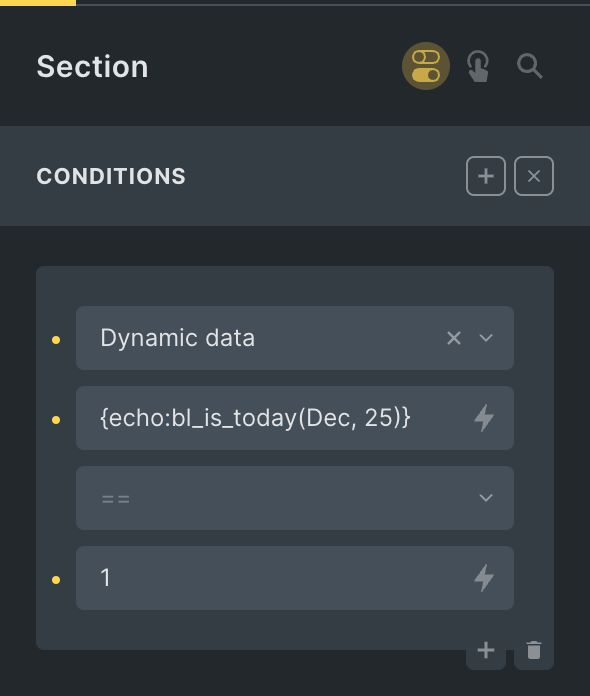
This Pro tutorial shows how we can define a custom function that takes in a month in the three-letter format (like Dec) and a day number (like 25) and use it with Dynamic data condition of Bricks to output or not output elements on specific month and day whilst taking the site’s timezone setting into account.
Use case: Render a banner only on special days/holidays every year automatically. Ex.: on Christmas day.
Step 1
Add this in child theme‘s functions.php or a code snippets plugin:
// Function to check if today is the specified day of the specified month (3-letter format).
// Sample usage: bl_is_today( 'Jan', '1' )
function bl_is_today( $month, $day ) {
	// today's date in 3-letter month and day w/o leading zeros format
	$today = wp_date( 'M j' );

	// split today's date into month and day
	$today = explode( ' ', $today );

	// today's month
	$today_month = $today[0];

	// today's day
	$today_day = $today[1];

	// check if today's month and day match the specified month and day
	return $today_month == $month && $today_day == $day;
}
Step 2
Add a Dynamic data condition on the element of interest like this:
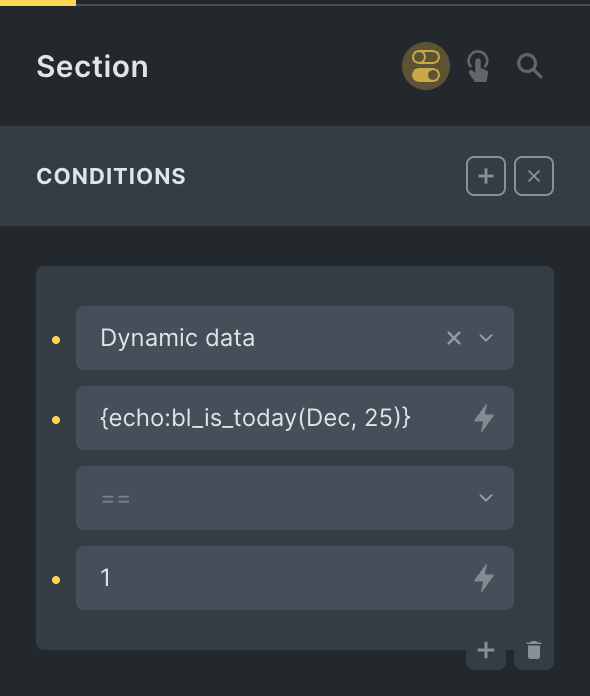
{echo:bl_is_today(Dec, 25)}
If you would like the Section to be rendered only if today is NOT 25 Dec i.e., on all other days of every year, change 1 to 0.
Reference
https://developer.wordpress.org/reference/functions/wp_date/