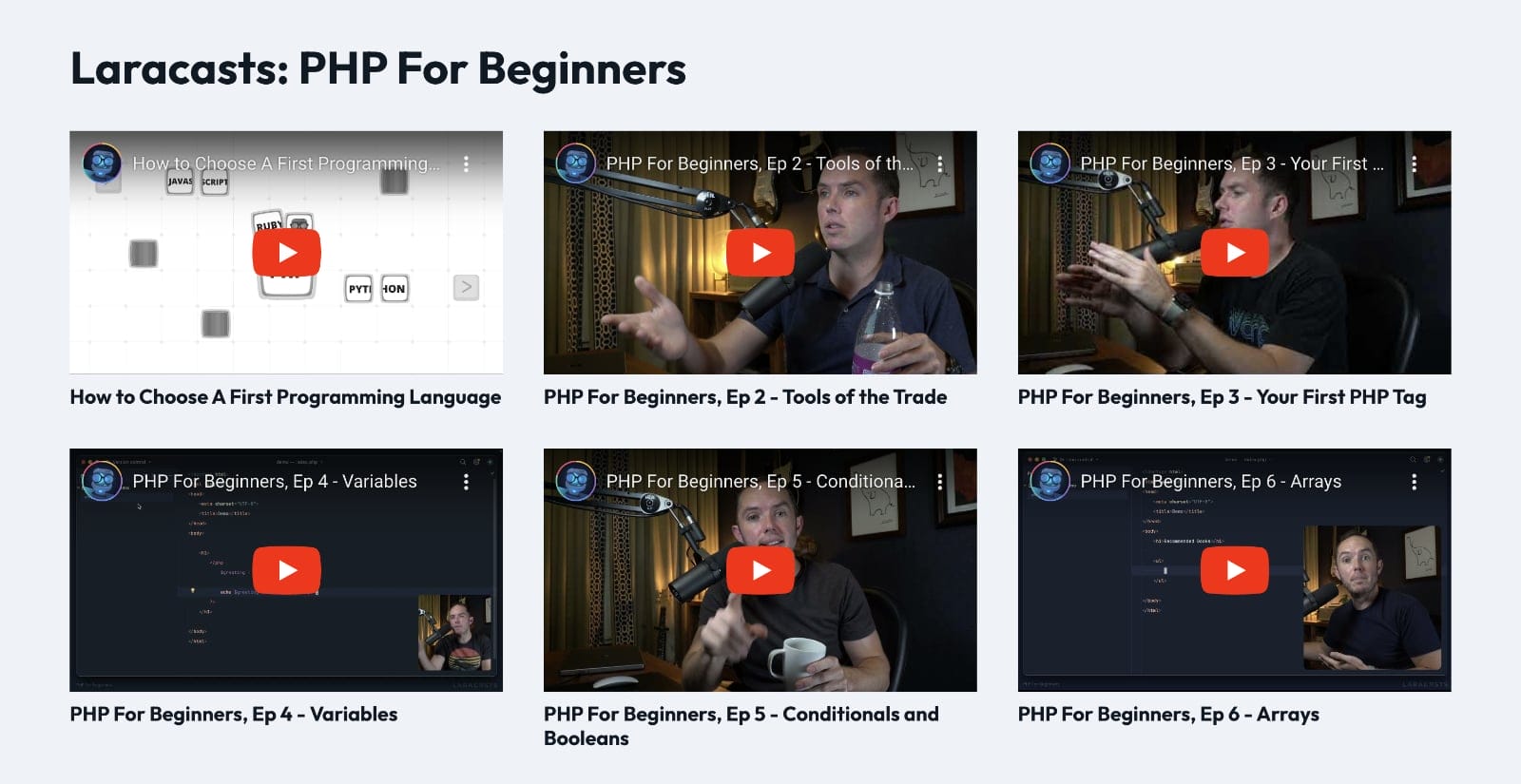
Updated on 16 Feb 2024
In the BricksLabs Facebook group a user asked:
I’ve been battling to display a YouTube Playlist in grid form on a site. The Bricks Video element does not allow for playlists.
From searching Bricks community platforms, most suggestions are to use a 3rd party plugin.
Is it at all possible to do this without a 3rd party plugin? If so; – I’d love to see a tutorial on this.
This Pro tutorial provides the steps to register a custom query type, which, when selected, enables you to use Bricks elements like Video, Heading, and Image to output the embedded video iframe, title, and thumbnail of videos of a specified YouTube playlist in a Bricks query loop.
We shall use YouTube Data API.

Step 1
Go to the Google Cloud Platform Console and get an API key for the YouTube Data API.
The general outline is that you’d first create a Project, switch to it, go to “APIs and services”, click “Enable APIs and Services” button, search for youtube, click “YouTube Data API”, enable it, go to Credentials, create a credential of API key type to get the API key.

Details:
- You need a Google Account to access the Google API Console, request an API key, and register your application.
- Create a project in the Google Developers Console and obtain authorization credentials so your application can submit API requests.
- After creating your project, make sure the YouTube Data API is one of the services that your application is registered to use:
- Go to the API Console and select the project that you just registered.
- Visit the Enabled APIs page. In the list of APIs, make sure the status is ON for the YouTube Data API v3.
Step 2
Keep your desired YT playlist’s ID handy.
In this example, we shall use this playlist:
https://www.youtube.com/playlist?list=PL3VM-unCzF8ipG50KDjnzhugceoSG3RTCso the ID is: PL3VM-unCzF8ipG50KDjnzhugceoSG3RTC
Step 3
Add the following in child theme‘s functions.php (w/o the opening PHP tag) or a code snippets plugin:
<?php

/* Add new query type control to query options */
add_filter( 'bricks/setup/control_options', function ( $control_options ) {
    /* Adding a new option in the dropdown */
    $control_options['queryTypes']['youtube_playlist'] = esc_html__( 'YT Playlist' );

    return $control_options;
} );

/* Run new query if option selected */
add_filter( 'bricks/query/run', function ( $results, $query_obj ) {
    if ( $query_obj->object_type !== 'youtube_playlist' ) {
        return $results;
    }

    /* If option is selected, run our new query */
    if ( $query_obj->object_type === 'youtube_playlist' ) {
        $results = bl_run_yt_playlist_query();
    }

    return $results;
}, 10, 2 );

/* Return results from our YouTube Data API */
function bl_run_yt_playlist_query() {
    $playlistId = 'PL3VM-unCzF8ipG50KDjnzhugceoSG3RTC';

    $api_key = 'AIzaSyDaGmWKa4JsXZ-HjGw7ISLn_3namBGewQe';

    $maxResults = 6; // max is 50, default is 5

    $url = "https://www.googleapis.com/youtube/v3/playlistItems?part=snippet,id&playlistId=$playlistId&key=$api_key&maxResults=$maxResults";

    $request = wp_remote_get( $url );

    if ( is_wp_error( $request ) ) {
        return []; // Bail early on request error.
    }

    $response = wp_remote_retrieve_body( $request );

    $playlist_array = json_decode( $response, true );

    if ( empty( $playlist_array['items'] ) ) {
        return []; // Bail if no videos are found.
    }

    $video_objects = [];

    foreach ( $playlist_array['items'] as $item ) {
        $video_objects[] = [
            'id' => $item['snippet']['resourceId']['videoId'],
            'title' => $item['snippet']['title'],
            'thumb-standard' => $item['snippet']['thumbnails']['standard']['url'],
        ];
    }

    return $video_objects;
}

// Function to get the current looping object.
if ( ! function_exists( 'bl_get_loop_object' ) ) {
    function bl_get_loop_object(): array {
        $looping_query_id = BricksQuery::is_any_looping();

        if ( $looping_query_id ) {
            return BricksQuery::get_loop_object( $looping_query_id );
        }

        // fallback, this won't be the one that's output
        return [];
    }
}
Set your playlist ID and API key in
$playlistId = 'PL3VM-unCzF8ipG50KDjnzhugceoSG3RTC';

$api_key = 'AIzaSyDaGmWKa4JsXZ-HjGw7ISLn_3namBGewQe';
Set the number of videos you’d like to show in
$maxResults = 6; // max is 50, default is 5Step 4
We are setting each query loop object to have these properties with corresponding values pulled from the API response:
- id
- title
- thumb-standard
Step 5
Back in the Bricks editor, add a Section and inside its Container, set up a query loop.

Add a Video element inside, leave the Source as YouTube and set its ID to:
{echo:bl_get_loop_object:array_value|id}
If you want to output the video titles below, add a Heading and set its text to:
{echo:bl_get_loop_object:array_value|title}
If you want to output the video thumb in standard size, add an Image element and paste this in the External URL field:
{echo:bl_get_loop_object:array_value|thumb-standard}
To show the videos in a grid, on the query loop-enabled parent (typically, a Container):

References
https://developers.google.com/youtube/v3/docs/playlistItems
https://developers.google.com/youtube/v3/docs/playlistItems/list
https://www.codeproject.com/Tips/998364/Youtube-video-list-with-PHP