It is possible in Bricks to output the value returned by any function via
{echo:functionName}
whilst passing arguments if needed.
Sometimes you may want to add your own items to the “Select dynamic data” list since it is more convenient/easier.
This Pro tutorial provides one way to do this. We shall register a “Parent link” dynamic data tag which when selected sets the hyperlink URL to the parent post/Page of the current post/loop item and if a parent is not present, to #.

Prerequisite
Bricks child theme must be the active theme.
Step 1
Copy
/wp-content/themes/bricks/includes/integrations/dynamic-data/providers.php
to
/wp-content/themes/bricks-child/providers.php
Replace
$classname = 'BricksIntegrationsDynamic_DataProvidersProvider_' . str_replace( ' ', '_', ucwords( str_replace( '-', ' ', $provider ) ) );with
$classname = 'BricksLabsProvider_' . str_replace( ' ', '_', ucwords( str_replace( '-', ' ', $provider ) ) );Here BricksLabs refers to the namespace (think of this like a group) that we are going to place all our relevant PHP files in. If you change the namespace name to something else, remember to also change it in the other steps.
Immediately below the opening PHP tag at the top, add
namespace BricksLabs;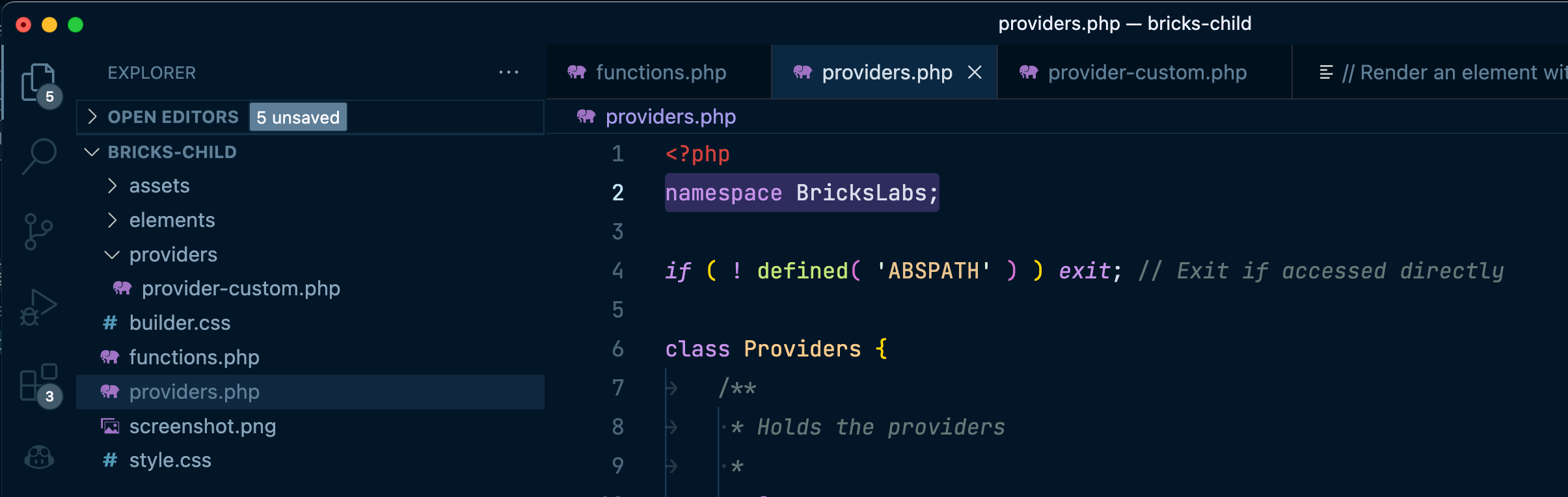
Step 2
Create a directory named say, providers in the child theme.
Create a file named say, provider-custom.php inside the above directory having this content:
<?php
namespace BricksLabs;

if ( ! defined( 'ABSPATH' ) ) exit; // Exit if accessed directly

if ( ! class_exists("BricksIntegrationsDynamic_DataProvidersBase") ) {
	return;
}

class Provider_Custom extends BricksIntegrationsDynamic_DataProvidersBase {
    public function register_tags() {
		$tags = $this->get_tags_config();

		foreach ( $tags as $key => $tag ) {
			$this->tags[ $key ] = [
				'name'     => '{' . $key . '}',
				'label'    => $tag['label'],
				'group'    => $tag['group'],
				'provider' => $this->name,
			];

			if ( ! empty( $tag['deprecated'] ) ) {
				$this->tags[ $key ]['deprecated'] = $tag['deprecated'];
			}

			if ( ! empty( $tag['render'] ) ) {
				$this->tags[ $key ]['render'] = $tag['render'];
			}
		}
	}

    public function get_tags_config() {
		$tags = [
			// Post
			'bl_parent_url'          => [
				'label' => esc_html__( 'Parent link (BricksLabs)', 'bricks' ),
				'group' => 'post'
			]
		];

        return $tags;
    }

    /**
	 * Main function to render the tag value for WordPress provider
	 *
	 * @param [type] $tag
	 * @param [type] $post
	 * @param [type] $args
	 * @param [type] $context
	 * @return void
	 */
	public function get_tag_value( $tag, $post, $args, $context ) {
		$post_id = isset( $post->ID ) ? $post->ID : '';

		// STEP: Check for filter args
		$filters = $this->get_filters_from_args( $args );

		// STEP: Get the value
		$value = '';

		$render = isset( $this->tags[ $tag ]['render'] ) ? $this->tags[ $tag ]['render'] : $tag;

		switch ( $render ) {
			// Post
			case 'bl_parent_url':
				$parent_post = get_post_parent( $post_id );

				$value = $parent_post ? get_permalink( $parent_post->ID ) : '#';

				// $value = get_permalink( $post_id );
				break;
		}

		// STEP: Apply context (text, link, image, media)
		$value = $this->format_value_for_context( $value, $tag, $post_id, $filters, $context );

		return $value;
		// return '#';
	}
}
Most of the above code has been copied from /wp-content/themes/bricks/includes/integrations/dynamic-data/providers/provider-wp.php.
Note that we have set this file to be also in BricksLabs namespace.
We have set our custom dynamic data name (label) and tag in:
$tags = [
    // Post
    'bl_parent_url'          => [
        'label' => esc_html__( 'Parent link (BricksLabs)', 'bricks' ),
        'group' => 'post'
    ]
];
As to the logic of what should be returned when this dynamic tag is selected in the builder UI, we are writing it in:
case 'bl_parent_url':
    $parent_post = get_post_parent( $post_id );

    $value = $parent_post ? get_permalink( $parent_post->ID ) : '#';

    // $value = get_permalink( $post_id );
    break;
Step 3
Edit child theme’s functions.php.
Immediately below the opening PHP tag, add:
namespace BricksLabs;Change
add_action( 'init', function() {
	$element_files = [
		__DIR__ . '/elements/title.php',
		__DIR__ . '/elements/custom-post-excerpt.php',
	];

	foreach ( $element_files as $file ) {
		BricksElements::register_element( $file );
	}
}, 11 );
to
add_action( 'init', function() {
	$element_files = [
		__DIR__ . '/elements/title.php',
		__DIR__ . '/elements/custom-post-excerpt.php',
	];

	foreach ( $element_files as $file ) {
		BricksElements::register_element( $file );
	}

	if ( ! class_exists( 'Providers' ) ) {
		require_once 'providers.php';
		require_once 'providers/provider-custom.php';
	}

	$providers = [
		'custom'
	];

	if ( class_exists("BricksIntegrationsDynamic_DataProvidersBase") ) {
		Providers::register( $providers );
	}
}, 11 );
That’s it!
Your new dynamic tag is now ready to use.
Here’s the flow:
In the anonymous function that fires after WordPress has finished loading but before any headers are sent, we are first checking if there’s a PHP Class called Providers in the current namespace (BricksLabs).
if ( ! class_exists( 'Providers' ) ) {If it is not, we are including the content of providers.php and providers/provider-custom.php.
require_once 'providers.php';
require_once 'providers/provider-custom.php';
The Class Providers is defined in providers.php. Think of this file as the engine needed to register the custom provider.
The custom provider is defined in providers/provider-custom.php. Here we are creating a custom PHP class called Provider_Custom to be a child Class of Base which is present inside the parent Bricks theme’s BricksIntegrationsDynamic_DataProviders namespace.
class Provider_Custom extends BricksIntegrationsDynamic_DataProvidersBase {Back in functions.php, we check for the presence of this Base Class from the said namespace and if so, call the register method of the Providers PHP Class whilst passing in an array having custom string.
$providers = [
    'custom'
];

if ( class_exists("BricksIntegrationsDynamic_DataProvidersBase") ) {
    Providers::register( $providers );
}
Checking the function definition of this register, we can see that the first line is to create an instance of the Class in which it is present i.e., an instance of Providers is created.
$instance = new self( $providers );When an instance gets created, the first thing that automatically happens is that its constructor function gets fired i.e., custom array from functions.php is passed to the __construct method and custom array is set as the value of this Class’ providers_keys property.
public function __construct( $providers ) {
    $this->providers_keys = $providers;
}
The register method also hooks register_providers to init action.
add_action( 'init', [ $instance, 'register_providers' ], 10000 );and this is that function’s definition:
public function register_providers() {
    foreach ( $this->providers_keys as $provider ) {
        $classname = 'BricksLabsProvider_' . str_replace( ' ', '_', ucwords( str_replace( '-', ' ', $provider ) ) );

        if ( $classname::load_me() ) {
            $this->providers[ $provider ] = new $classname( str_replace( '-', '_', $provider ) );
        }
    }
}
We are looping through the array that was passed from functions.php. In this case, we have just one array item: custom.
$classname becomes BricksLabsProvider_Custom.
and a new instance of the above Class gets created which then takes care of registering our custom dynamic tag and running the logic when the tag is selected.
Reference
https://developer.wordpress.org/reference/functions/get_post_parent/