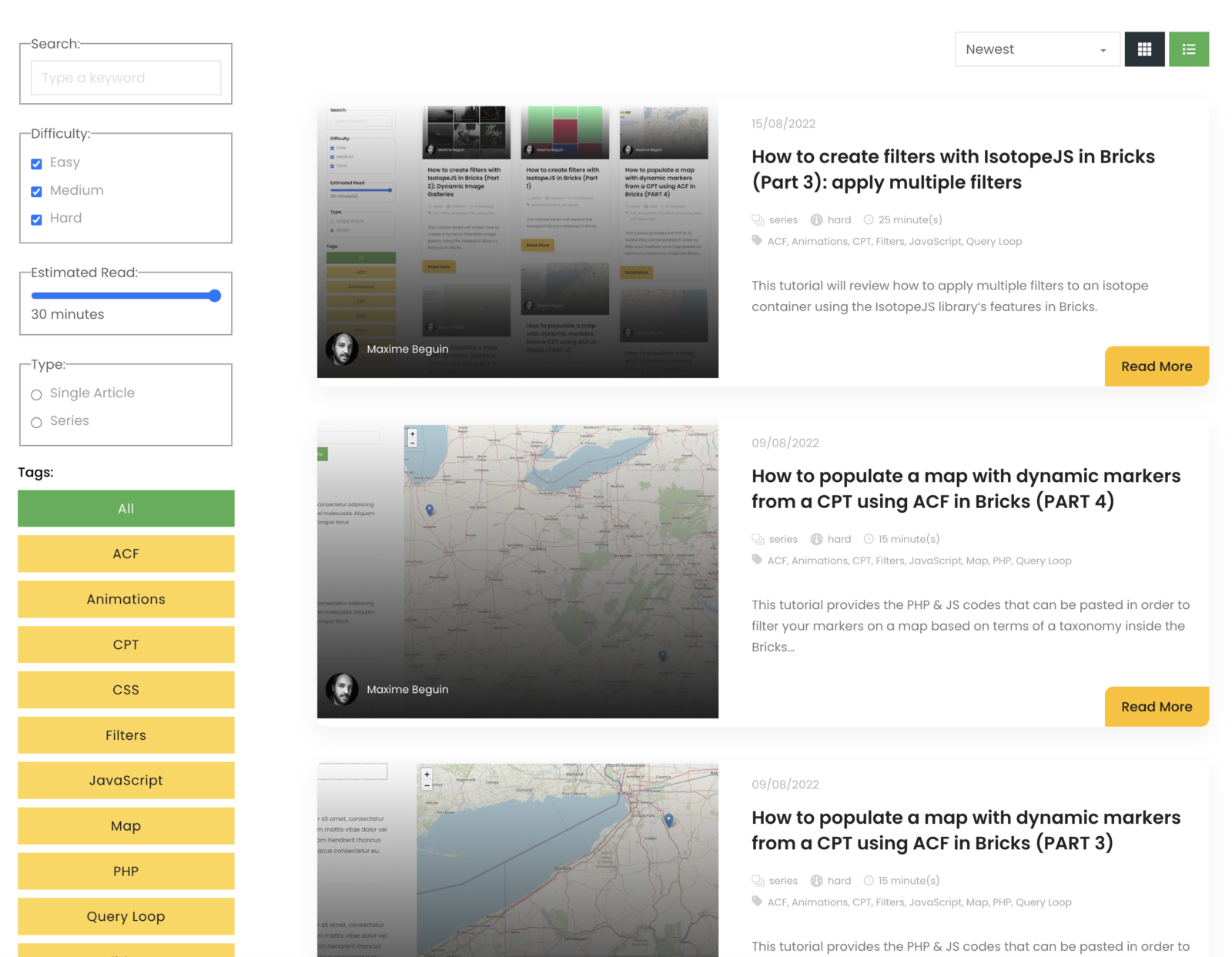
This tutorial will explain how to enable the AJAX filter with an infinite scroll query loop container, how to add a sorting function, how to add a list view selector and how to disable the CSS animation when filtering the items using Isotope in Bricks builder.
Table of Contents
- Requirements
- AJAX filter on infinite scroll query loops container
- Disable the CSS animation
- Sorting function
- List view
- Final Code
- Conclusion
Requirements
- Everything working from PART 3.
AJAX filter on infinite scroll query loops container
It sounds hard to implement but it’s way easier than it looks. All the credits for this go to Jenn Lee who explained to me how to use the AJAX endpoint created by bricks and found the correct AJAX function to trigger isotope when new content is being loaded.
The first step is to enable the infinite scroll setting inside your query loop container and set a limit to your posts_per_page:

I had a few errors when I set this setting on my server – somehow the loop wasn’t querying the correct post_id for some unknown reason and the infinite loop returned erros, so make sure the infinite loop work without isotope enabled before jumping on the next steps.
Paste the following code to enable the AJAX filter in your init.js file (see the final code to see exactly where it should be pasted):
const open = window.XMLHttpRequest.prototype.open;

function XMLOpenReplacement() {
   this.addEventListener("load", function () {
      let current_url = new URL(this.responseURL);
      if (current_url.pathname.includes("/load_query_page")) {

         //reload the items
         iso.reloadItems();

         //set the padding
         if (wrapper.dataset.gutter) {
            isotopeSelector = wrapper.querySelectorAll('.isotope-selector');
            isotopeSelector.forEach(elm => elm.style.paddingBottom = isotopeGutter + 'px');
         }

         //rearrange the container
         iso.arrange();
      }
   });
   return open.apply(this, arguments);
}
window.XMLHttpRequest.prototype.open = XMLOpenReplacement;
Without going into too much details, the function tasks advantage of the endpoint created by Bricks called load_query_page. We created an EventListener function that triggers our isotope functions every time the AJAX endpoint is being loaded.
The isotope-related functions are pretty basic: first, we reload all the items so the isotope container includes all the selectors – including the new ones, then we apply the gutter padding to all of them if the gutter was set, and finally, we rearrange the isotope container to reorder/fix the layout. And that’s pretty much it.
Disable the CSS animation
One thing bothered me though: each time we load new items through AJAX, the new items have a transform animation like they are flying from the top to their new bottom position.
If this annoys you, you can simply deactivate the animations on all the selectors by adding one line in our isotopeOptions variable:
var isotopeOptions = {
   transitionDuration: 0,
};
Sorting function
A few people asked for a sorting function, so let’s do that now.
This time we’ll add a select dropdown input field with the sorting value that we want to apply: sort by newest, oldest, A to Z and Z to A.
Add this code in a code element:
<select name="sorting" id="sorting">
  <option value="newest">Newest</option>
  <option value="oldest">Oldest</option>
  <option value="a_to_z">A to Z</option>
  <option value="z_to_a">Z to A</option>
</select>
Note that I slightly changed my DOM structure in order to put the dropdown (and grid/list views buttons) on top of the isotope container:

Now let’s jump into the init.js file and store the query of new input:
var sorting = wrapper.querySelector('#sorting');
if (!sorting) {
   console.log('No Sorting input found. Make sure your sorting dropdown input has the ID "#sorting"');
}
We have to declare the sorting criteria in our isotopeOptions variable. In our case, we’ll add name (“A to Z” and “Z to A”) and date (“Newest” and “Oldest”):
var isotopeOptions = {
   getSortData: {
      name: (el) => {
         return el.querySelector('.post-title').textContent;
      },
      date: (el) => {
         return el.querySelector('.post-date').textContent;
      }
   },
};
You can see that in both functions we query an inner element inside our element and grab the text content: the Post Title for name and the Post Date for date. Make sure to add the classes .post-title and .post-date to your bricks elements.
The last step is to create an EventListener function that will trigger our sorting function each time the value of the dropdown is changed:
// Event Listener for sorting
if (sorting) {
   sorting.addEventListener('change', (e) => {

      switch (e.target.value) {
         case "newest":
            iso.arrange({
               sortBy: 'date',
               sortAscending: false
            });
            break;
         case "oldest":
            iso.arrange({
               sortBy: 'date',
               sortAscending: true
            });
            break;
         case "a_to_z":
            iso.arrange({
               sortBy: 'name',
               sortAscending: true
            });
            break;
         case "z_to_a":
            iso.arrange({
               sortBy: 'name',
               sortAscending: false
            });
            break;
         default:
            return;
      }
   })
}
Every time the value of the dropdown changes, we will run a switch function and check for the corresponding cases. If the value matches one of our cases, it’ll rearrange the isotope container with the sortBy condition and the correct Ascending/Descending order we assigned through sortAscending.
List view
This is pretty straightforward. Let’s add two buttons in our new topbar container and assign grid-view and list-view as their respective IDs.
In the init.js file, let’s query the buttons:
var gridView = wrapper.querySelector('#grid-view');
// Show a message in console if no grid-view buttons have been found
if (!gridView) {
   console.log('No grid-view button found. Make sure that your grid-view button has the ID "#grid-view"')
}

var listView = wrapper.querySelector('#list-view');
// Show a message in console if no list-view buttons have been found
if (!listView) {
   console.log('No list-view button found. Make sure that your list-view button has the ID "#grid-view"')
}
And add their respective EventListener functions:
//Event Listerner for grid-view
if (gridView) {
   gridView.addEventListener('click', (e) => {
      e.preventDefault();
      gridView.classList.add('filterbtn--active');
      listView.classList.remove('filterbtn--active');
      isotopeContainer.classList.remove('list');
      iso.arrange();
   })
}

//Event Listerner for list-view
if (listView) {
   listView.addEventListener('click', (e) => {
      e.preventDefault();
      listView.classList.add('filterbtn--active');
      gridView.classList.remove('filterbtn--active');
      isotopeContainer.classList.add('list');
      iso.arrange();
   })
}
The script will toggle the filterbtn--active class if the button is clicked. Note that we are reusing the active class we created earlier in PART 2 but feel free to create your own specific class and style it inside the Bricks builder.
But the most important: we toggle a list class on the isotope container. Now the only thing to do is to insert the following CSS in your page settings:
.isotope-container.list {
    --col: 1;
}
By just changing the CSS variable --col we recalculate all the dimensions of our isotope container.
Optionally, you can style your list view as you wish by targeting the .isotope-container.list class. Unfortunately, you’ll have to write your CSS manually as Bricks doesn’t support this feature yet.
Here is the CSS I added in my example:
@media screen and (min-width: 1200px) {

	/* ARTICLE */
	.isotope-container.list article {
		flex-direction: row !important;
		align-items: stretch;
		gap: 20px;
	}

	/* LEFT COL */
	.isotope-container.list article>a {
		max-width: 45%;
		align-self: stretch !important;
		flex-basis: 100%;
	}

	/*RIGHT COL */
	.isotope-container.list article>div {
		flex-basis: 100%;
	}

	/* FEATURE IMAGE */
	.isotope-container.list article>a>img {
		aspect-ratio: unset;
		position: absolute;
		top: 50%;
		left: 50%;
		bottom: 0;
		right: 0;
		width: 100%;
		height: 100%;
		transform: translate(-50%, -50%);
	}

	/* READ MORE BUTTONS */
	.isotope-container.list article>div>a {
		margin: 0;
		align-self: end;
	}

	.isotope-container.list article>div>a>div {
		border-radius: 10px 0 10px 0 !important;
	}
}
And that’s it!
Final Code
Here is the final code of our init.js file:
window.addEventListener('DOMContentLoaded', () => {

   const isotopeWrappers = document.querySelectorAll('.isotope-wrapper');

   // Stop the function if there is no isotope wrapper detected
   if (isotopeWrappers.length < 1) {
      return console.log('No isotope wrapper found. Make sure to add the ".isotope-wrapper" class to the main isotope wrapper');
   };

   // Default variable

   // buttons
   var filterRes = true;
   var filterSelector = "*";
   // search
   var filterSearch = true;
   var qsRegex
   // range
   var filterRange = true;
   var filterRangeValue = '*';
   // checkbox
   var filterCheckbox = true;
   var filterCheckboxValue = '*';
   // radio
   var filterRadio = true;
   var filterRadioValue = '*';


   // Loop inside each isotope wrapper
   isotopeWrappers.forEach(wrapper => {

      // Set variable and Error Handling

      var isotopeContainer = wrapper.querySelector('.isotope-container');
      if (!isotopeContainer) {
         return console.log('No isotope container found. Make sure to add the ".isotope-container" class to the container of your selectors');
      }

      var isotopeSelector = isotopeContainer.querySelectorAll('.isotope-container .isotope-selector');
      if (isotopeSelector.length < 1) {
         return console.log('No isotope selector found. Make sure to add the ".isotope-selector" class to all your selector');
      }

      var buttons = wrapper.querySelectorAll(".filterbtn-container .filterbtn");
      // Show a message in console if no buttons have been found
      if (buttons.length < 1) {
         console.log('No filter wrapper or filter buttons found. Make sure your filter wrapper has the class ".filterbtn-wrapper" and all your filter buttons have the class ".filterbtn"');
      }

      var quickSearch = wrapper.querySelector('#quicksearch');
      // Show a message in console if no search input have been found
      if (!quickSearch) {
         console.log('No QuickSearch found. Make sure your search input has the ID "#quicksearch"');
      }

      var range = wrapper.querySelector('#range');
      // Show a message in console if no range slider have been found
      if (!range) {
         console.log('No Range found. Make sure your range input has the ID "#range"');
      }

      var checkboxes = wrapper.querySelectorAll('.checkbox');
      // Show a message in console if no checkboxes have been found
      if (checkboxes.length < 1) {
         console.log('No checkbox found. Make sure your checkbox input has the class ".checkbox"');
      }

      var radios = wrapper.querySelectorAll('.radio');
      // Show a message in console if no radio buttons have been found
      if (checkboxes.length < 1) {
         console.log('No radio found. Make sure your radio input has the class ".radio"');
      }

      var sorting = wrapper.querySelector('#sorting');
      if (!sorting) {
         console.log('No Sorting found. Make sure your sorting dropdown input has the ID "#sorting"');
      }

      var gridView = wrapper.querySelector('#grid-view');
      // Show a message in console if no grid-view buttons have been found
      if (!gridView) {
         console.log('No grid-view button found. Make sure that your grid-view button has the ID "#grid-view"')
      }

      var listView = wrapper.querySelector('#list-view');
      // Show a message in console if no list-view buttons have been found
      if (!listView) {
         console.log('No list-view button found. Make sure that your list-view button has the ID "#grid-view"')
      }

      // Gutter Settings through data-gutter
      if (wrapper.dataset.gutter) {
         var isotopeGutter = parseInt(wrapper.dataset.gutter);
         wrapper.style.setProperty('--gutter', isotopeGutter + 'px');
         isotopeSelector.forEach(elm => elm.style.paddingBottom = isotopeGutter + 'px');
      } else {
         // Default option
         var isotopeGutter = 0;
         console.log('No data-gutter attribute has been found on your isotope container. Default set to 0.');
      };


      // Layout Settings through data-filter-layout
      if (wrapper.dataset.filterLayout) {
         var isotopeLayoutHelper = wrapper.dataset.filterLayout;
      } else {
         // Default option
         var isotopeLayoutHelper = 'fitRows';
         console.log('No data-filter-layout attribute has been found on your isotope container. Default set to "fitRows".');
      };

      // init Isotope

      var isotopeOptions = {
         itemSelector: '.isotope-selector',
         layoutMode: isotopeLayoutHelper,
         //transitionDuration: 0, /Uncomment to disable animations
         getSortData: {
            name: (el) => {
               return el.querySelector('.post-title').textContent;
            },
            date: (el) => {
               return el.querySelector('.post-date').textContent;
            }
         },
         filter: (itemElem1, itemElem2) => {
            const itemElem = itemElem1 || itemElem2;

            // tags/buttons
            if (buttons.length > 0) {
               filterRes = filterSelector != '*' ? itemElem.dataset.filter.includes(filterSelector) : true;
            }

            // quicksearch
            if (quickSearch) {
               filterSearch = qsRegex ? itemElem.textContent.match(qsRegex) : true;
            }

            // range
            if (range) {
               filterRange = filterRangeValue != '*' ? parseInt(itemElem.dataset.range) <= filterRangeValue : true;
            }

            // checkboxes
            if (checkboxes.length > 0) {
               filterCheckbox = filterCheckboxValue != '*' ? filterCheckboxValue.includes(itemElem.dataset.checkbox) : true;
            }

            // radio
            if (radios.length > 0) {
               filterRadio = filterRadioValue != '*' ? filterRadioValue.includes(itemElem.dataset.radio) : true;
            }


            return filterRes && filterSearch && filterRange && filterCheckbox && filterRadio;
         }
      };


      // Set the correct layout
      switch (isotopeLayoutHelper) {
         case 'fitRows':
            isotopeOptions.fitRows = {
               gutter: isotopeGutter
            };
            break;
         case 'masonry':
            isotopeOptions.masonry = {
               gutter: isotopeGutter
            };
            break;
      }

      var iso = new Isotope(isotopeContainer, isotopeOptions);

      // debounce so filtering doesn't happen every millisecond
      const debounce = (fn, threshold) => {
         var timeout;
         threshold = threshold || 200;
         return function debounced() {
            clearTimeout(timeout);
            var args = arguments;
            var _this = this;

            function delayed() {
               fn.apply(_this, args);
            }
            timeout = setTimeout(delayed, threshold);
         };
      };

      // Event Listener for buttons
      if (buttons.length > 0) {

         buttons.forEach(elem => elem.addEventListener("click", (event) => {

            event.preventDefault();

            // get the data-filter attribute from the filter button
            var filterValue = event.target.getAttribute("data-filter");
            filterSelector = filterValue;

            // filter results
            iso.arrange();
         }));
      };

      // Event Listener for search input
      if (quickSearch) {
         quickSearch.addEventListener('keyup', debounce((event) => {

            qsRegex = new RegExp(quickSearch.value, 'gi');

            //filter the store list
            iso.arrange();

         }, 200));
      }

      // Event Listener for range slider
      if (range) {
         const rangeFilterFN = (e) => {
            filterRangeValue = parseInt(e.target.value);

            //filter the store list
            iso.arrange();
         }

         range.addEventListener('input', debounce((e) => {

            rangeFilterFN(e);

         }, 200));

         range.addEventListener('keyup', debounce((e) => {

            rangeFilterFN(e);

         }, 200));
      }

      // Event Listener for checkboxes
      if (checkboxes) {
         checkboxes.forEach(checkbox => {
            checkbox.addEventListener('click', debounce(() => {
               arrCheckbox = [];

               checkboxes.forEach(cb => {
                  if (!cb.checked) {
                     return;
                  }
                  arrCheckbox.push(cb.value);

               })

               filterCheckboxValue = arrCheckbox;

               //filter the store list
               iso.arrange();

            }, 200));
         })
      }

      // Event Listener for radio buttons
      if (radios) {
         radios.forEach(radio => {
            radio.addEventListener('change', debounce(() => {
               arrRadio = [];

               radios.forEach(radio => {
                  if (!radio.checked) {
                     return;
                  }
                  arrRadio.push(radio.value);

               })

               filterRadioValue = arrRadio;

               //filter the store list
               iso.arrange();

            }, 200));
         })
      }

      // Event Listener for sorting
      if (sorting) {
         sorting.addEventListener('change', (e) => {

            switch (e.target.value) {
               case "newest":
                  iso.arrange({
                     sortBy: 'date',
                     sortAscending: false
                  });
                  break;
               case "oldest":
                  iso.arrange({
                     sortBy: 'date',
                     sortAscending: true
                  });
                  break;
               case "a_to_z":
                  iso.arrange({
                     sortBy: 'name',
                     sortAscending: true
                  });
                  break;
               case "z_to_a":
                  iso.arrange({
                     sortBy: 'name',
                     sortAscending: false
                  });
                  break;
               default:
                  return;
            }
         })
      }

      //Event Listener for grid-view
      if (gridView) {
         gridView.addEventListener('click', (e) => {
            e.preventDefault();
            gridView.classList.add('filterbtn--active');
            listView.classList.remove('filterbtn--active');
            isotopeContainer.classList.remove('list');
            iso.arrange();
         })
      }

      // Event Listener for list-view
      if (listView) {
         listView.addEventListener('click', (e) => {
            e.preventDefault();
            listView.classList.add('filterbtn--active');
            gridView.classList.remove('filterbtn--active');
            isotopeContainer.classList.add('list');
            iso.arrange();
         })
      }

      // Event Listener for filter buttons
      const radioButtonGroup = (buttonGroup) => {

         buttonGroup.addEventListener("click", (event) => {
            buttons.forEach(btn => btn.classList.remove("filterbtn--active"));
            event.target.classList.add("filterbtn--active");
         });
      };

      // change is-checked class on buttons
      for (var i = 0, len = buttons.length; i < len; i++) {

         var buttonGroup = buttons[i];
         radioButtonGroup(buttonGroup);
      };
      setTimeout(() => {
         iso.arrange()
      }, 300);

      // AJAX FILTER
      const open = window.XMLHttpRequest.prototype.open;

      function XMLOpenReplacement() {
         this.addEventListener("load", function () {
            let current_url = new URL(this.responseURL);
            if (current_url.pathname.includes("/load_query_page")) {

               //reload the items
               iso.reloadItems();

               //set the padding
               if (wrapper.dataset.gutter) {
                  isotopeSelector = wrapper.querySelectorAll('.isotope-selector');
                  isotopeSelector.forEach(elm => elm.style.paddingBottom = isotopeGutter + 'px');
               }

               //rearrange the container
               iso.arrange();
            }
         });
         return open.apply(this, arguments);
      }
      window.XMLHttpRequest.prototype.open = XMLOpenReplacement;
   });

});
Conclusion
Unless there are some specific requests popping up from the community, this tutorial closes the Isotope series on how to integrate smart filters into your next Bricks project without adding any third-party plugin. Hope you enjoyed it!