Updated on 20 Aug 2024
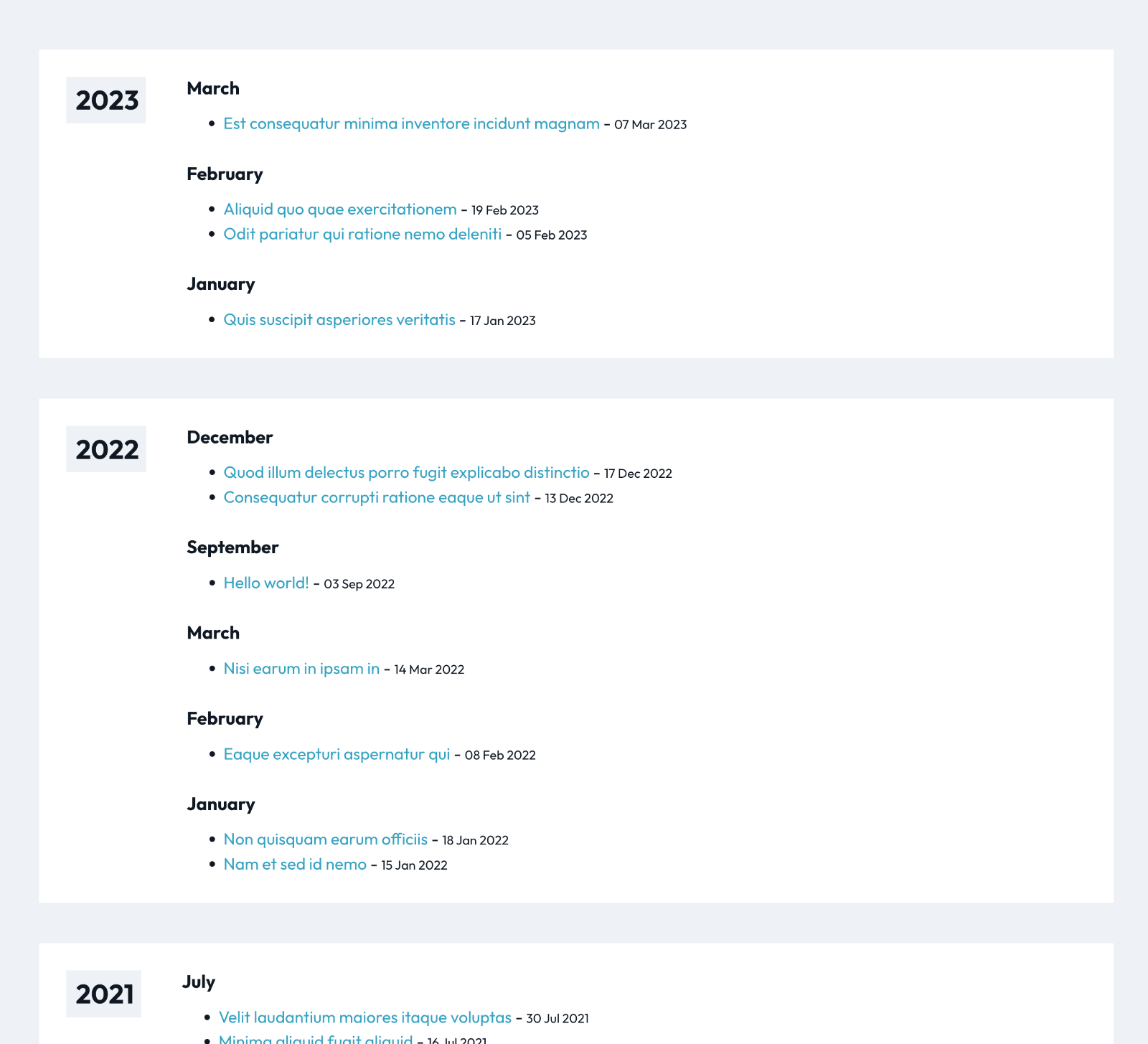
This Pro tutorial provides the steps to display posts (can be of any post type) organized by months within years based on the published date in Bricks.
If you want to do the same but with a date-type custom field value, refer to Events grouped by years within months based on event date custom field value.
We shall
- write a custom PHP function that prepares and returns the data needed in the form of three arrays (sample screenshot|mirror)
- register two custom query types – one for years and another for months (in which there are published posts)
- set up a Years query loop and within that, a Months query loop and within that, a Posts query loop to output posts that are published in the outer two loops i.e., that iteration of year and that iteration of month.

Step 1
Add the following in child theme‘s functions.php (w/o the opening PHP tag) or a code snippets plugin:
<?php

// Add new "Years" and "Months" query loop type options in the dropdown.
add_filter( 'bricks/setup/control_options', function( $control_options ): array {
	$control_options['queryTypes']['years'] = esc_html__( 'Years' );
    $control_options['queryTypes']['months'] = esc_html__( 'Months' );

	return $control_options;
} );

// Run new query if option selected.
add_filter( 'bricks/query/run', function( $results, $query_obj ): array {
	if ( $query_obj->object_type !== 'years' && $query_obj->object_type !== 'months' ) return $results;

	// if option is selected, run our new query
	if ( $query_obj->object_type === 'years' ) {
		$results = bl_get_year_months_posts_data()['years'];
	}

    if ( $query_obj->object_type === 'months' ) {
        // Current looping year
        $year = BricksQuery::get_loop_object( itchy_get_bricks_looping_parent_query_id_by_level() );

        // Associative array with years as keys and array of months (during which posts were published) as values
        $year_months = bl_get_year_months_posts_data()['year_months'];

        // Return the current looping year's months
        $results = $year_months[ $year ] ?? [];
	}

	return $results;
}, 10, 2 );

function bl_get_year_months_posts_data(): array {
    $year_month_post_ids = [];
    $year_months = [];

    $posts = get_posts( [
        'post_type'      => 'post', // Set your post type here
        'posts_per_page' => -1, // Fetch all posts
        'orderby'        => 'date',
        'order'          => 'DESC',
    ] );

    foreach ( $posts as $post ) {
        // Get the post date in the site's timezone
        $post_date = new DateTimeImmutable( get_the_date( 'Y-m-d H:i:s', $post ), wp_timezone() );

        // Format the year and month
        $year = $post_date->format( 'Y' );
        $month = $post_date->format( 'F' );

        // Initialize arrays if not set
        if ( ! isset( $year_month_post_ids[ $year ] ) ) {
            $year_month_post_ids[ $year ] = [];
            $year_months[ $year ] = [];
        }

        if ( ! isset( $year_month_post_ids[ $year ][ $month ] ) ) {
            $year_month_post_ids[ $year ][ $month ] = [];
        }

        // Add post ID to the appropriate year and month
        $year_month_post_ids[ $year ][ $month ][] = $post->ID;

        // Add month to year_months if not already present
        if ( ! in_array( $month, $year_months[ $year ] ) ) {
            $year_months[ $year ][] = $month;
        }
    }

    // Sort months within each year
    foreach ( $year_months as &$months ) {
        usort( $months, function( $a, $b ) {
            return date_create( $b )->format( 'n' ) - date_create( $a )->format( 'n' );
        } );
    }

    // Sort years in descending order
    krsort( $year_month_post_ids );
    krsort( $year_months );

    return [
        'years'       => array_keys( $year_month_post_ids ), // https://d.pr/i/uLYvxe
        'year_months' => $year_months, // https://d.pr/i/8T4DgH
        'data'        => $year_month_post_ids, // https://d.pr/i/LPz0Ma
    ];
}

// Function to get the year of the current looping query.
function bl_get_post_year(): string {
	$looping_query_id = BricksQuery::is_any_looping();

	if ( $looping_query_id && BricksQuery::get_query_object_type( $looping_query_id ) === 'years' ) {
		return BricksQuery::get_loop_object( $looping_query_id );
	}

	// return current year in 4 digit format - this is only a fallback and won't be the one that's output
	return date( 'Y' );
}

// Function to get the current looping object.
if ( ! function_exists( 'bl_get_loop_object_string' ) ) {
	function bl_get_loop_object_string(): string {
		$looping_query_id = BricksQuery::is_any_looping();

		if ( $looping_query_id ) {
			return BricksQuery::get_loop_object( $looping_query_id );
		}

		// fallback, this won't be the one that's output
		return '';
	}
}

// Helper function to get looping parent query Id by level. Default is parent of the current loop.
// https://itchycode.com/bricks-builder-useful-functions-and-tips/
if ( ! function_exists( 'itchy_get_bricks_looping_parent_query_id_by_level' ) ) {
    function itchy_get_bricks_looping_parent_query_id_by_level( $level = 1 ) {
        global $bricks_loop_query;

        if ( empty( $bricks_loop_query ) || $level < 1 ) {
            return false;
        }

        $current_query_id = BricksQuery::is_any_looping();

        if ( ! $current_query_id ) {
            return false;
        }

        if ( ! isset( $bricks_loop_query[ $current_query_id ] ) ) {
            return false;
        }

        $query_ids = array_reverse( array_keys( $bricks_loop_query ) );

        if ( ! isset( $query_ids[ $level ] )) {
            return false;
        }

        if ( $bricks_loop_query[ $query_ids[ $level ] ]->is_looping ) {
            return $query_ids[ $level ];
        }

        return false;
    }
}
In
$posts = get_posts([
  'post_type' => 'post', // Set your post type here
  'posts_per_page' => 100, // Set this to a large number
]);
set your desired post type and posts per page (this should exceed the number of total posts that could ever be in the site)
Step 2
Whitelist these functions:
bl_get_post_yearbl_get_loop_object_string
Ex.:
<?php

add_filter( 'bricks/code/echo_function_names', function() {
  return [
    // 'date',
    'bl_get_post_year',
    'bl_get_loop_object_string'
  ];
} );
You should also add any other functions (native or custom) being used in your Bricks instance. This can be checked at Bricks → Settings → Custom code by clicking the Code review button.
More info on whitelisting can be found here.
Step 3
Edit the Page in which you’d like the output to be with Bricks.
Copy this JSON (of a Section) and paste.
Note: ACSS variables are used in our dev site. If you do not use ACSS, you could replace them with your own variables or px/em/rem/calc values.
Select the Post Loop Block element’s query loop PHP editor.
Change the post type and posts per page values if needed.
Click the ‘Sign code’ button.
Check the front end.