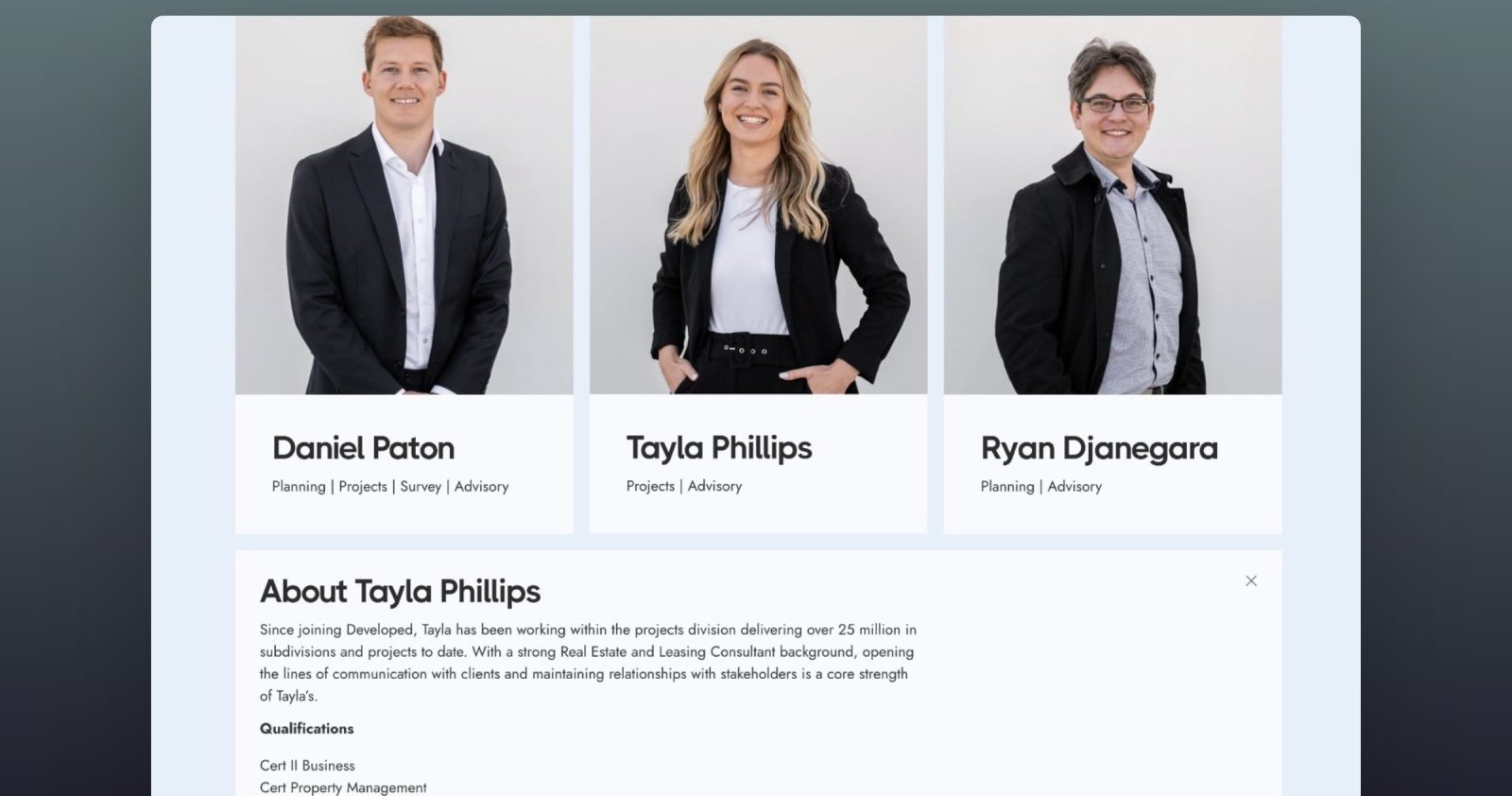
This Pro tutorial provides the steps to set up a query loop on a nestable accordion element in Bricks such that the “titles” are arranged in a grid with the corresponding content (panels) opening below the clicked title either taking up the container width or going edge to edge.
We shall also add a working close icon for the panels.
Use Case: Show team member cards with member info neatly expanding when the headshot + name is clicked.
Since a standard nestable accordion element is being used with a query loop, we have full control w.r.t what info appears before and after the accordion items expand. In the screenshot below, several custom field values that are set up with ACF are being shown.
Sample demo of content in the container width:
Sample demo with edge to edge content:
Step 1
Edit your Page/template with Bricks.
Step 2
Container width
Copy this Section’s JSON code and paste in the editor.

Click on the query icon next to Item layer in the structure panel. Set/change Post type if needed.
Click on “Accordion (Nestable)” → STYLE → CSS.
Set your container width if changed/set in a Bricks’ Theme Style (it is 1100px out of the box in Bricks) and desired gap as values of the custom properties. You would need to also set your container width in the media query line here:
@media (max-width: 1280px) {Note: The CSS needs adjustment if the number of columns is changed. You may find this page helpful.
Click on Settings (gear icon) → PAGE SETTINGS → CUSTOM CODE → Body (footer) scripts:
<script>

// when any .accordion__close-icon is clicked, locate its parent having a class of "accordion__item" and trigger a click on .accordion-title-wrapper inside
document.querySelectorAll(".accordion__close-icon").forEach((icon) => {
  icon.addEventListener("click", () => {
    icon
    .closest(".accordion__item")
    .querySelector(".accordion-title-wrapper")
    .click()
  })
})

</script>
Edge to edge
Copy this Section’s JSON code and paste in the editor.

Click on the query icon next to Item layer in the structure panel. Set/change Post type if needed.
Click on “Accordion (Nestable)” → STYLE → CSS.
Set your container width if changed/set in a Bricks’ Theme Style (it is 1100px out of the box in Bricks) and desired gap as values of the custom properties. You would need to also set your container width in the media query line here:
@media (max-width: 1280px) {Note: The CSS needs adjustment if the number of columns is changed. You may find this page helpful.
Click on Settings (gear icon) → PAGE SETTINGS → CUSTOM CODE → Body (footer) scripts:
<script>

// when any .accordion__close-icon is clicked, locate its parent having a class of "accordion__item" and trigger a click on .accordion-title-wrapper inside
document.querySelectorAll(".accordion__close-icon").forEach((icon) => {
  icon.addEventListener("click", () => {
    icon
    .closest(".accordion__item")
    .querySelector(".accordion-title-wrapper")
    .click()
  })
})

</script>